Design - Create - Grow


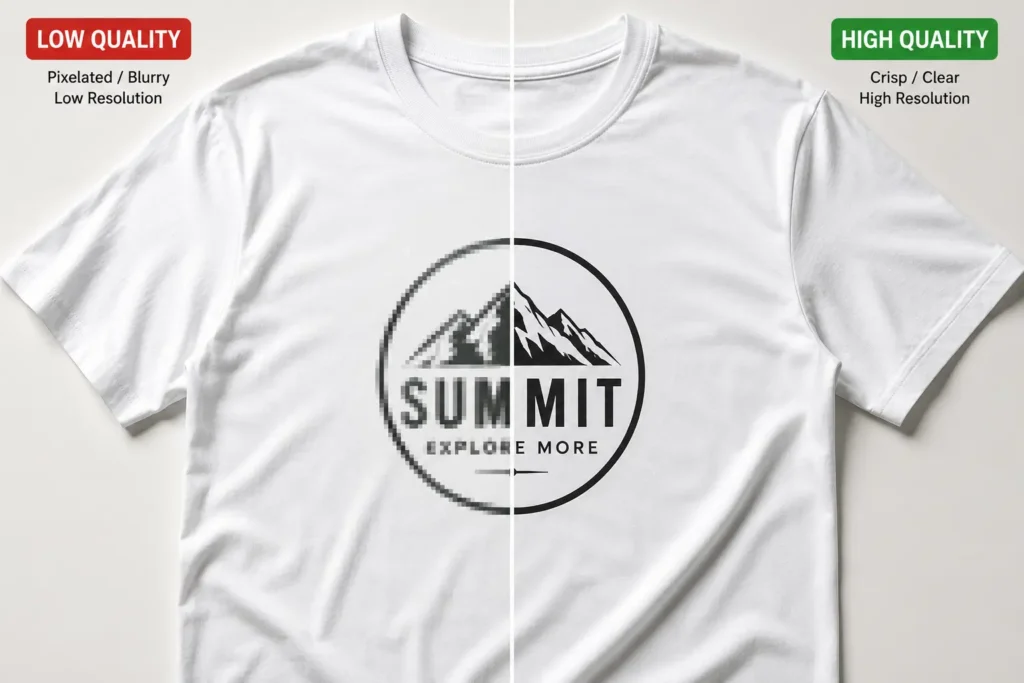
You finally got the sample back from the factory, and the print looks nothing like what you designed. The edges are soft, the small text is a blurry smudge, and the collar placement is off by half an inch. Sound familiar? This is the single most common — and most expensive — mistake new streetwear brands make, and it almost always traces back to one root cause: sending a raster file (PSD/PNG) to a factory that needed vector clothing mockups.
If you’ve been designing your drops in Photoshop and wondering why production keeps rejecting your tech packs or why your screen printer keeps asking for “the vector,” this article is for you. There’s a real difference between designing a flat lay for your Instagram grid and designing artwork that a factory can actually cut, print, and grade across sizes. Vector clothing mockups solve that gap.
Below, we’ll break down the real difference between raster and vector files, why nearly every professional streetwear brand builds its tech packs around Illustrator (AI) files instead of Photoshop, and how to set your own files up so your next production run comes back clean the first time — not the third time. For the full picture beyond mockups, our Illustrator vs other tools guide compares every serious tech pack software option side by side.
⚡ Quick Answer: Streetwear brands prefer vector clothing mockups because the artwork is built from mathematical paths instead of pixels, so it can scale from a small chest hit to an oversized back print without losing a single ounce of quality. Factories also rely on that same clean line data to build accurate screen printing separations and embroidery digitizing files — something a flattened PSD simply can’t provide reliably.
Raster vs Vector: What’s the Difference?
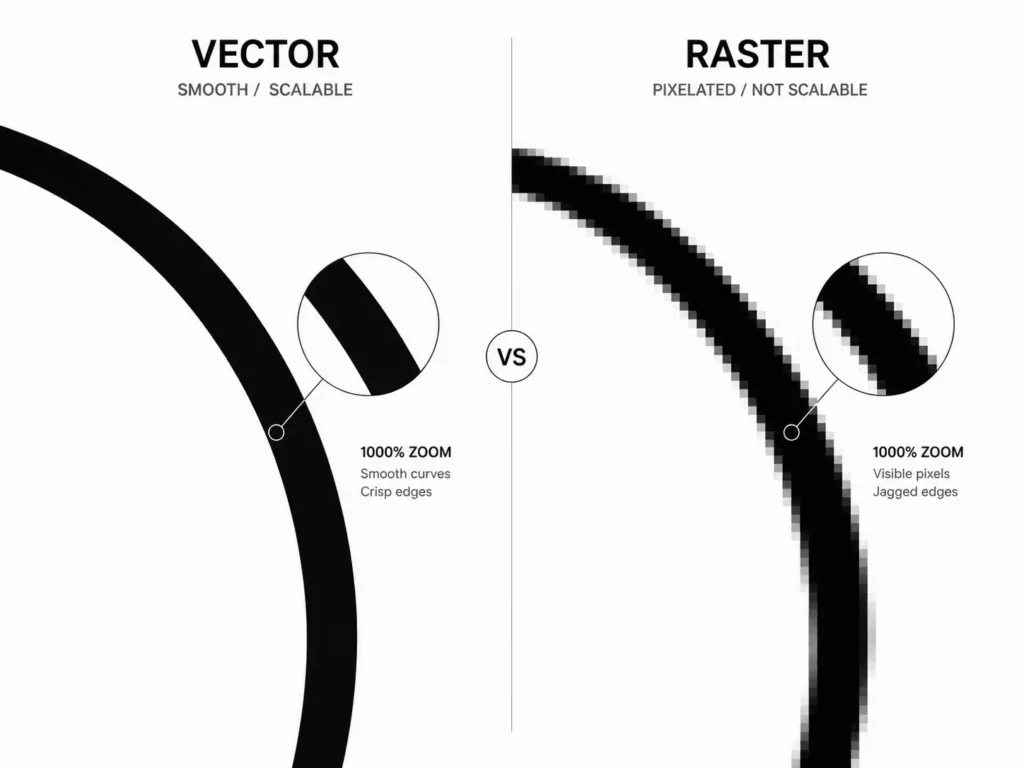
Vector clothing mockups are apparel templates and artwork built from mathematical points, lines, and curves (typically in Adobe Illustrator) rather than a fixed grid of colored pixels. Because the shapes are calculated rather than drawn dot-by-dot, they can be resized to any dimension — from a hang tag to a billboard — with zero blur, softening, or pixelation.
Photoshop, by contrast, works in raster format: every image is a grid of tiny colored squares (pixels) locked to a specific resolution. Zoom in far enough on any PSD or PNG and you’ll eventually see the blocky edges, no matter how high the original resolution was.
Here’s the practical breakdown:
- Illustrator (AI/SVG/EPS) — vector, built on paths, infinitely scalable, small file sizes, ideal for line art and flat artwork
- Photoshop (PSD/PNG/JPG) — raster, built on pixels, fixed resolution, larger file sizes, ideal for photorealistic textures and lighting
This is exactly why illustrator clothing mockups have become the industry standard for production artwork, while Photoshop still owns the marketing side of the business — the lifestyle shoots, the model flat lays, the Instagram content.
| Feature | Vector (Illustrator/AI) | Raster (Photoshop/PSD) |
|---|---|---|
| Scalability | Infinite — resize from a tag to a banner with zero quality loss | Fixed to resolution — enlarging causes pixelation |
| File Size | Small, math-based data | Large, especially at print resolution (300 DPI+) |
| Factory Preference | Preferred/required for tech packs and separations | Generally rejected for production artwork |
| Best Use Case | Manufacturing, tech packs, screen printing, embroidery | Marketing photos, Instagram content, lifestyle mockups |
| Print Quality | Crisp, clean edges at any size | Sharp only at the resolution it was created for |
💡 Pro Tip: If a file’s quality changes when you zoom in, it’s raster. If it looks identical at 10% and 1000% zoom, it’s vector. That single test tells you instantly which format you’re holding.
Why Streetwear Brands Prefer Vector Files
Ask any experienced print production manager why they keep pushing designers toward Illustrator, and you’ll hear the same three answers every time: scalability, print production, and factory communication.
1. Scalability across the size run. A logo that sits perfectly on a Small tee needs to grade cleanly up to an XXL without the artwork stretching, blurring, or shifting proportion. Scalable apparel mockup files let a grading team resize the same clean artwork across an entire size run — S through XXL — without ever touching a pixel-based file that would degrade at the extremes.
2. Print production and separations. Screen printing requires color separations — literally splitting your design into individual layers, one per ink color, each burned onto its own screen. Vector paths make this process fast and precise. Embroidery digitizing works the same way: digitizers trace clean vector paths to generate stitch files, and a crisp line converts far more accurately than a soft, anti-aliased raster edge. Blurry raster edges create jagged, uneven embroidery and muddy screen prints — the exact “why does my print look cheap” problem so many new brands run into.
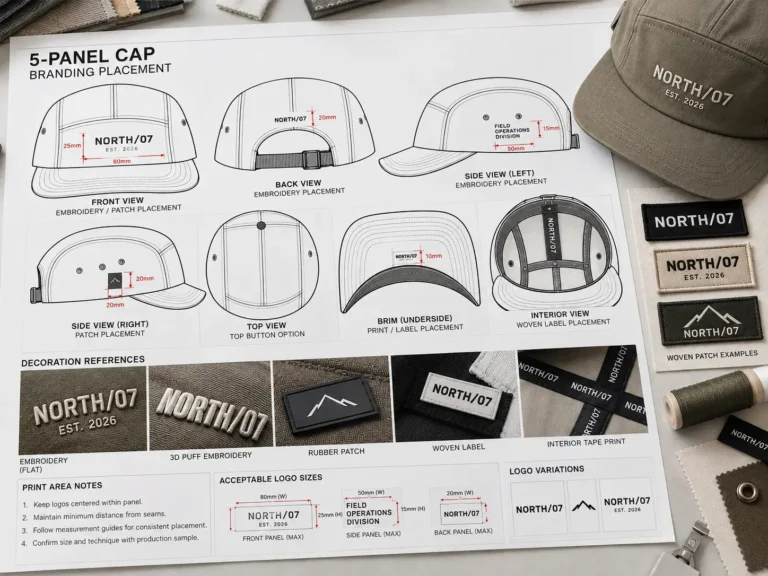
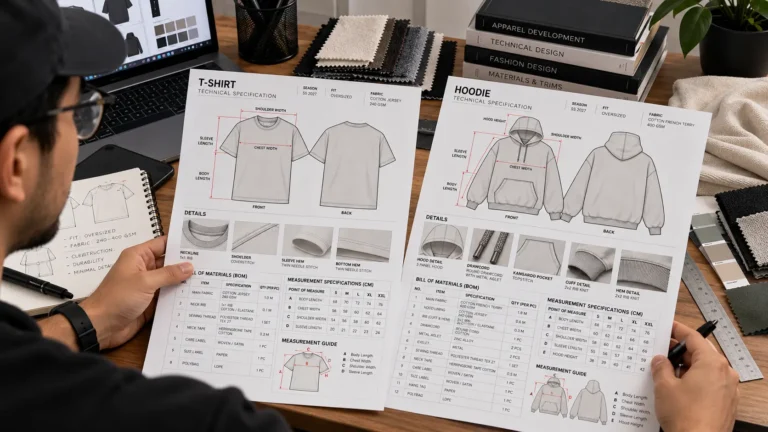
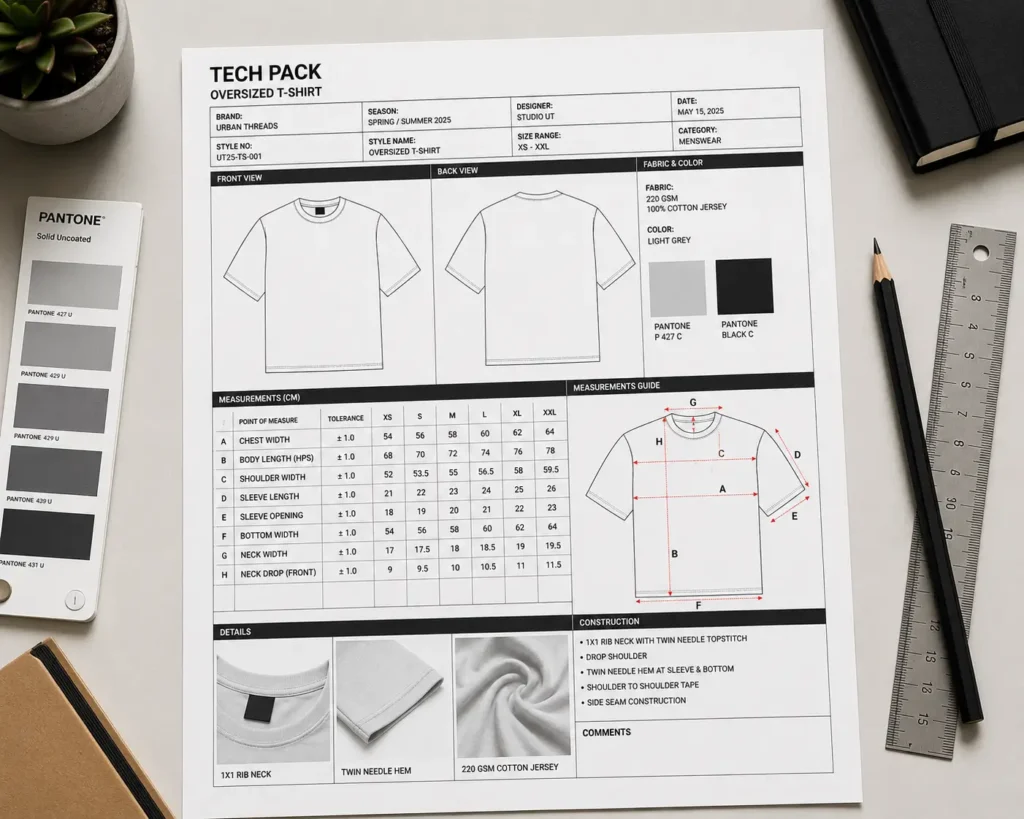
3. Factory communication. A tech pack is essentially the instruction manual you hand a factory. Measurements need to be exact, artwork placement needs to be unambiguous, and there’s no room for a factory to guess. Clean vector lines with locked dimensions remove that ambiguity entirely, which is why so many manufacturing garment specs and tech pack templates are built natively in Illustrator rather than Photoshop.
Put simply: professional designers reach for AI files because the format itself enforces the precision that manufacturing demands. A PSD can look fine on a laptop screen and still fail completely on a cutting table or a screen printing press.
Top Vector Clothing Mockups & Templates
If you’re ready to move your production artwork off Photoshop and onto a proper vector workflow, here’s an honest look at the main options on the market right now — including where each one falls short.
1. S.i. Graphics Complete Vector Mockup Library — Best Overall Value
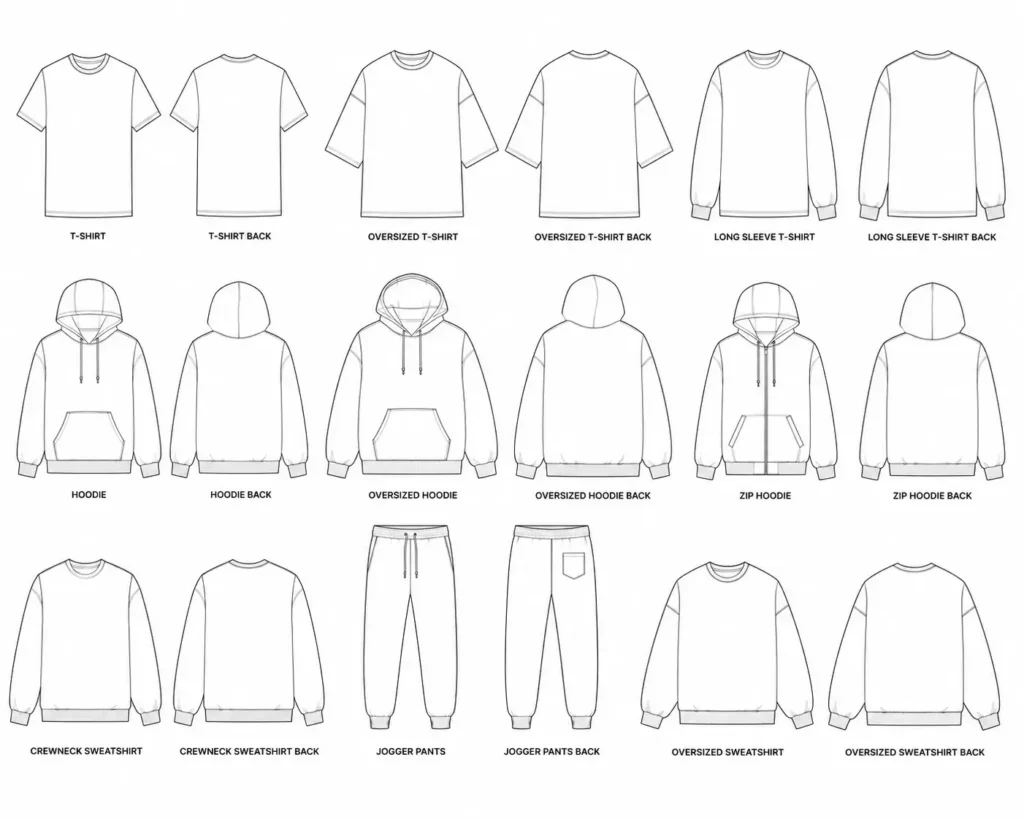
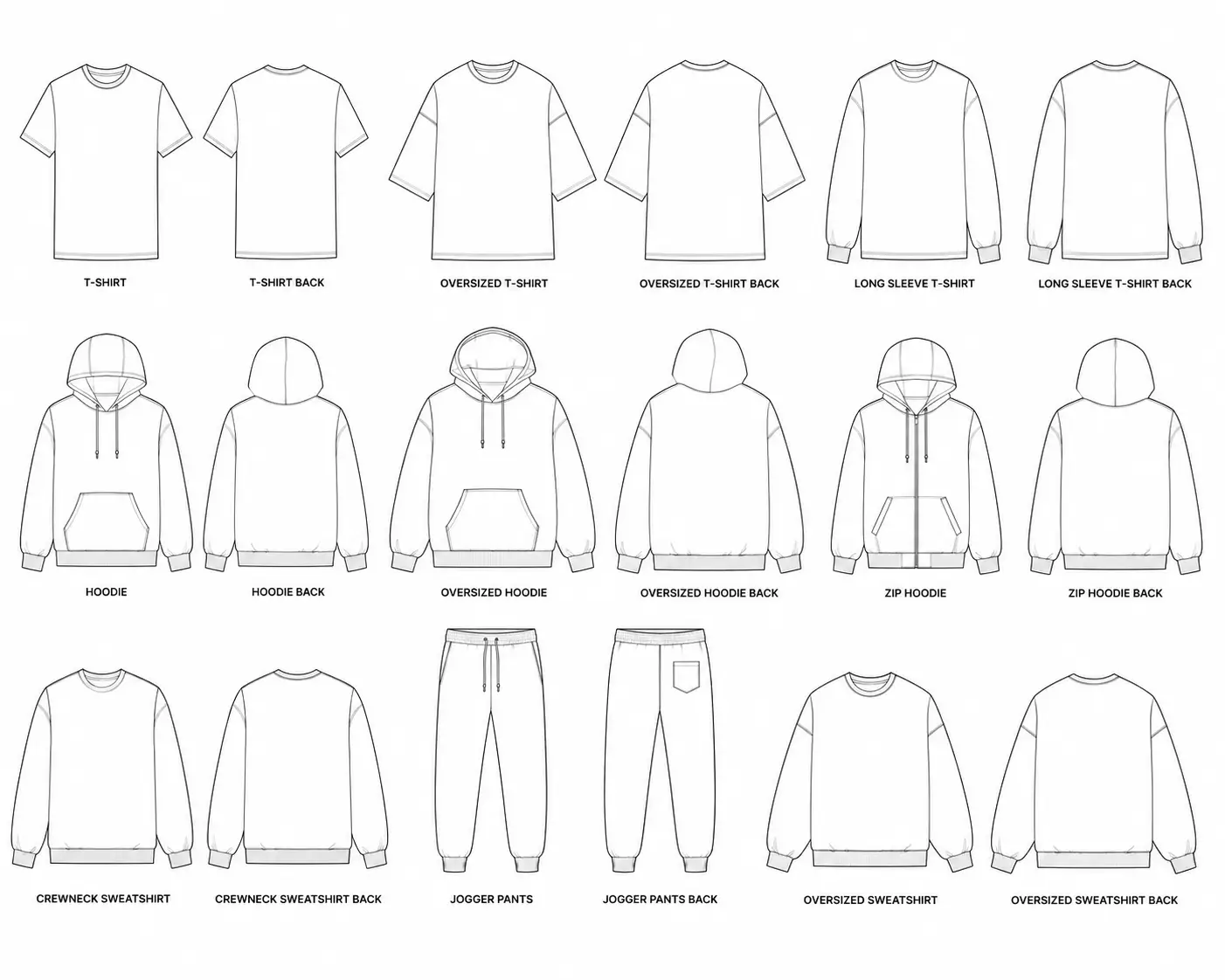
The Mega Bundle is a full library of pure vector apparel templates — tees, hoodies, crewnecks, joggers, and more — built specifically so streetwear brands never have to touch a raster file for production artwork again. Every template is constructed from editable paths, meaning you can resize any piece from a small hang-tag hit to a full oversized back print without a single soft edge.
Price: $49.99 (one-time, commercial license included)
What’s included: AI, EPS, and SVG source files; layered and organized by garment type; commercial license for unlimited client/production use
Best for: Streetwear brand founders and designers who need a production-ready mockup library instead of building templates from scratch
Pros:
- ✓ 100% vector — infinitely scalable with zero pixelation
- ✓ Pre-organized layers make factory hand-off fast
- ✓ Commercial license covers unlimited garments and clients
- ✓ Covers the most common streetwear silhouettes in one purchase
- ✓ One-time cost, no subscription
Cons:
- ✗ Requires Illustrator (or another vector-compatible app) to edit
- ✗ Not designed for photorealistic marketing shots — pair with a PSD mockup for social content
2. Adobe Illustrator Tech Pack Template (S.i. Graphics) — Best for Factory Communication
This is a purpose-built tech pack template designed to standardize exactly what your factory receives: garment measurements, artwork placement, color callouts (including Pantone references), and construction notes, all pre-formatted on a clean Illustrator artboard. Instead of rebuilding a spec sheet from scratch for every style, you drop your measurements and artwork into a format factories already know how to read.
Price: Bundled with the Mega Bundle, or available as a standalone add-on
What’s included: Editable AI tech pack layout, measurement callout guides, Pantone/color reference fields, placement grid
Best for: Brands sending their first (or fiftieth) production run to a new factory and wanting to eliminate back-and-forth revisions
Pros:
- ✓ Reduces factory miscommunication and sample rejections
- ✓ Pantone/color callout fields built in
- ✓ Reusable across every future style
- ✓ Cuts down sample-revision turnaround time
Cons:
- ✗ Still requires you to know your own garment measurements accurately
- ✗ Best results come from pairing it with the full Mega Bundle library
3. Creative Market Vector Streetwear Packs — Best Alternative for Hand-Drawn Aesthetics
Creative Market hosts thousands of independent designers selling vector apparel packs, and it’s a solid option if you’re chasing a specific hand-drawn or illustrative streetwear look rather than a clean commercial template. Quality and file organization vary significantly by seller, so it takes more vetting than a single trusted source.
Price: Typically $15–$60 per pack, depending on the designer
Best for: Designers hunting for a distinctive illustrative style not covered by standard mockup libraries
Pros:
- ✓ Huge variety of artistic styles
- ✓ Independent creators, often unique aesthetics
- ✓ Individual packs can be affordable
Cons:
- ✗ Quality, file organization, and licensing terms vary pack to pack
- ✗ Few packs are built specifically around tech-pack-ready specs
4. Envato Elements Illustrator Mockups — Best for Subscription-Based Access
Envato Elements offers unlimited downloads of vector mockups (and everything else — fonts, stock photos, templates) under a monthly subscription. If you need a wide breadth of assets beyond just clothing mockups, the subscription model can work out cheaper than buying packs individually.
Price: Subscription-based, roughly $16–$30/month depending on the plan
Best for: Brands or agencies that need a broad asset library beyond just apparel templates
Pros:
- ✓ Unlimited downloads across many asset categories
- ✓ Regularly updated library
- ✓ Good if you need more than just clothing mockups
Cons:
- ✗ Ongoing subscription cost instead of a one-time purchase
- ✗ Apparel-specific selection is less specialized than a dedicated streetwear bundle
5. Freepik Free Vector Clothing Mockups — Best Free Option
Freepik’s free tier includes basic vector tee and hoodie outlines, and it’s a genuinely useful starting point if you’re still sketching concepts or don’t yet have a budget for production tools. Just be clear-eyed about the limitations: free templates are typically flat outlines without the layered structure, garment detail, or licensing clarity a real production run needs.
Price: $0
Best for: Early-stage concepting, mood boards, or students learning the software
Pros:
- ✓ Zero cost to start
- ✓ Good for quick concept sketches
Cons:
- ✗ Basic outlines only — lacks garment detail and layer organization
- ✗ Licensing is often restrictive or unclear for commercial production use
- ✗ Not production-ready for factory hand-off
How to Set Up Illustrator Files for Manufacturers
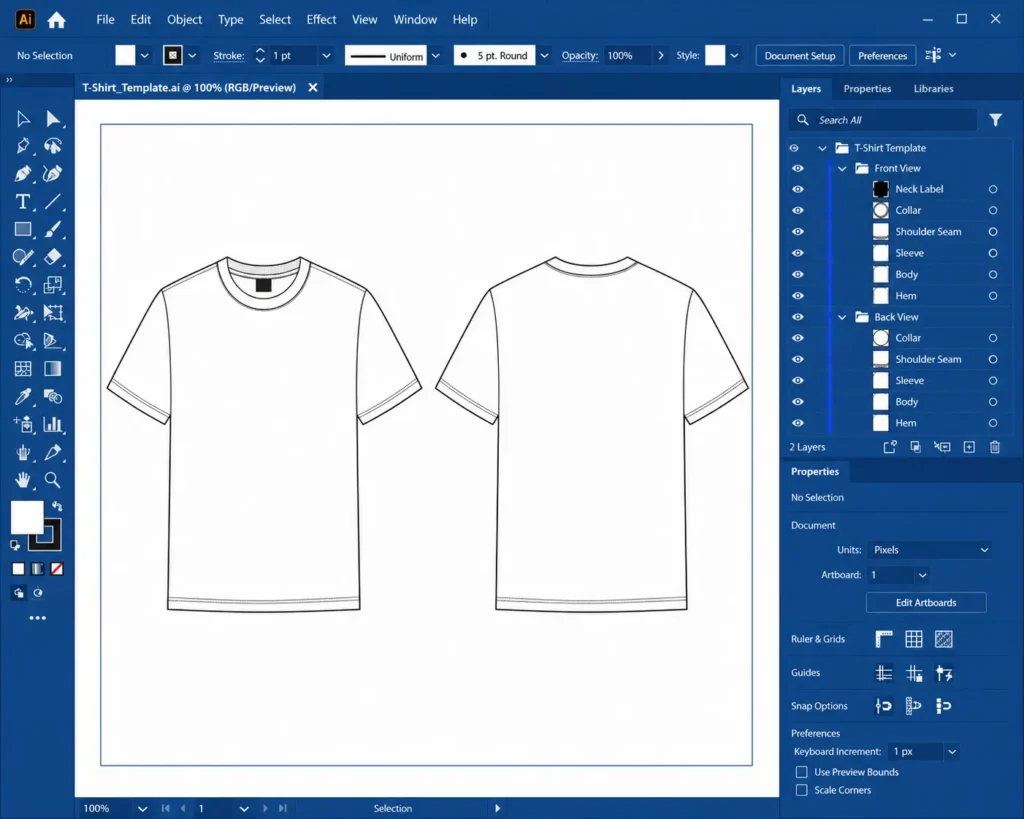
Owning a vector template is only step one — using it correctly is what actually prevents factory errors. Here’s the practical workflow:
- Apply your artwork to the vector template. Place your logo or graphic onto the correct garment template layer, keeping it as editable vector paths wherever possible rather than flattening it early.
- Scale your scalable apparel mockup files to true, life-size dimensions. Set your artboard to the garment’s actual measurements (in inches or cm) so a factory can trust the file’s proportions without guessing — a chest print sized at 8″ wide on your file should measure exactly 8″ on the finished garment.
- Convert all text to outlines. Fonts installed on your machine won’t exist on the factory’s computer. Before exporting, select your type and convert it to outlines (Shift+Ctrl+O / Shift+Cmd+O) so the text renders identically no matter who opens the file.
- Export for tech packs. Save a clean, layered PDF or AI file with placement guides, measurements, and color callouts clearly labeled, so the factory can reference one document instead of piecing together instructions from email threads.
💡 Pro Tip: Always convert your typography to outlines before sending your illustrator clothing mockups to a manufacturer — a missing font is one of the most common (and easily avoidable) causes of a botched print run.
Skipping any of these steps is how a design that looked perfect on your monitor comes back from the factory warped, mis-scaled, or missing text entirely.
Frequently Asked Questions
Why do factories ask for vector files instead of PSDs?
Factories need clean, editable line data to build screen printing separations and embroidery digitizing files. A PSD is a flattened grid of pixels — factories would have to manually re-trace it into vector paths anyway, adding time and introducing errors. Sending vector clothing mockups from the start skips that entire re-tracing step.
What is the difference between illustrator clothing mockups and PSDs?
Illustrator files are built from mathematical, resolution-independent paths — essentially lines and curves defined by math. PSDs are built from a fixed grid of colored pixel squares. That’s the whole distinction: math-based lines versus pixel-based squares, and it’s why one scales infinitely while the other doesn’t.
Can I use vector clothing mockups for tech packs?
Yes — vector files are actually the only recommended format for tech packs. Tech packs require exact measurements, clean placement guides, and editable artwork that a factory can reference precisely. Because vector art holds its accuracy at any zoom level, it’s the format manufacturing teams trust for production specs.
How do scalable apparel mockup files help with screen printing?
Screen printing requires the same artwork to be sized correctly across an entire run — a Small placement print and an XXL placement print need proportionally accurate scaling. Vector files resize cleanly across every size in the run without soft edges, so the separations stay crisp whether the shirt is a Small or a 2XL.
Do I need to be an Illustrator expert to use these templates?
No. Basic familiarity with the Selection tool, Pen tool, and clipping masks is enough to apply your artwork to a pre-built template. Most streetwear founders pick up the essential skills for placing and scaling artwork within a single afternoon of practice.
Are vector mockups good for Instagram marketing?
Not typically — vectors are built for production accuracy, not photorealism. For Instagram and marketing content, a photorealistic PSD mockup (with fabric texture, shadows, and lighting) will look far more appealing to customers. The two formats serve different jobs: vector for manufacturing, raster for marketing.
What file formats should I request from a designer for production?
Ask for AI, EPS, or SVG — all vector formats. If a designer only offers a PSD or PNG, request the original vector source file, since factories and screen printers need the editable path data, not a flattened image.
Will a vector file guarantee a perfect print every time?
It removes the most common cause of production errors — scaling and edge quality — but a perfect print also depends on accurate measurements, correct Pantone color callouts, and clear factory communication in your tech pack. Vector files are the foundation; a complete tech pack is what closes the loop.