Design - Create - Grow


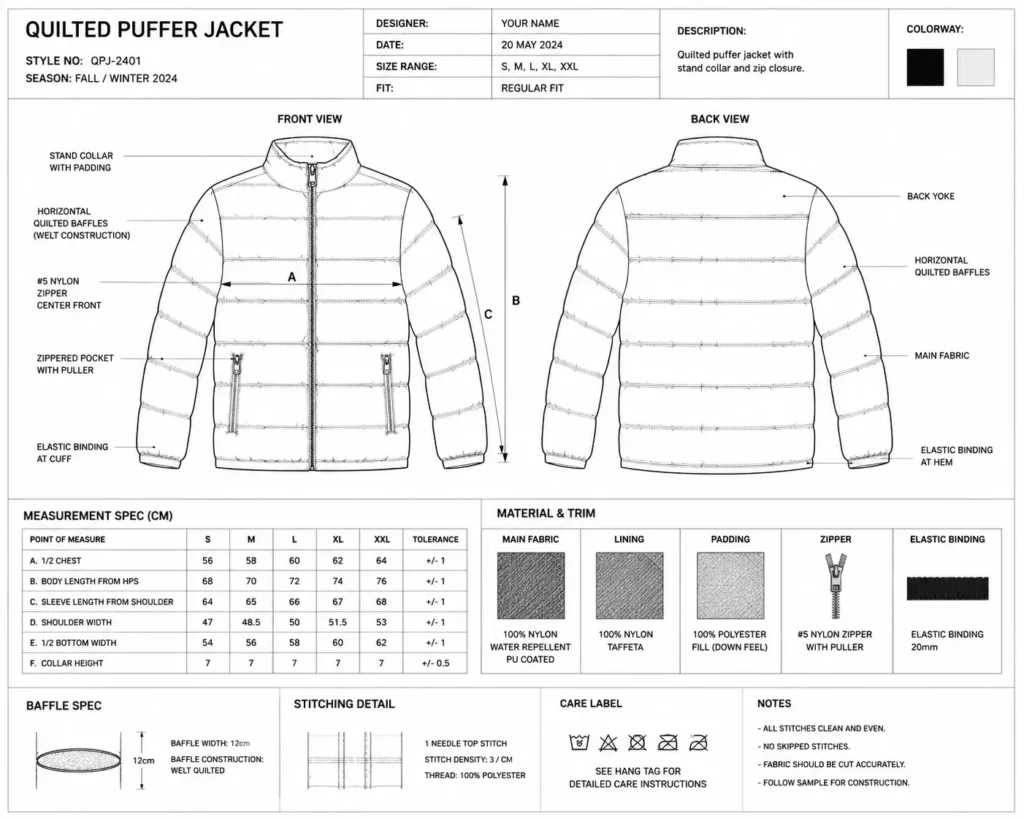
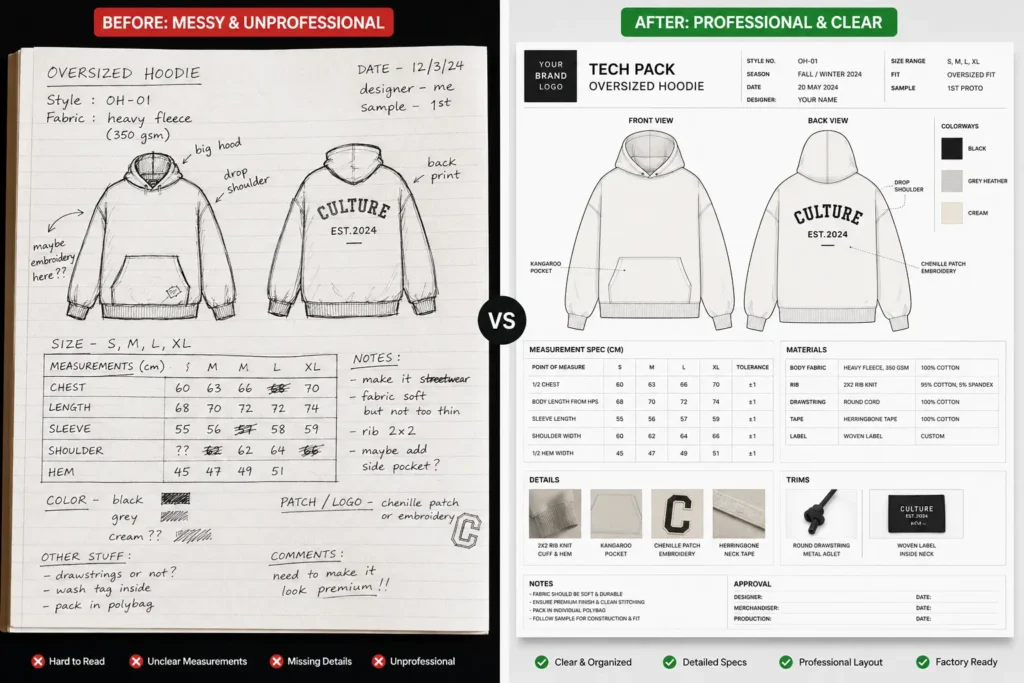
Trying to manufacture a premium puffer but don’t have a proper puffer jacket tech pack? You’re not alone. Most advanced founders can sketch a great silhouette, but when it’s time to spec baffle widths, fill power, and lining weights for an overseas factory, the wheels come off.
Here’s the problem: outerwear is unforgiving. A hoodie sample that comes back slightly off is annoying. A puffer sample that comes back with the wrong baffle spacing, the wrong down fill ratio, or mismatched zipper hardware can cost you weeks and hundreds of dollars in wasted factory fees — and that’s before you’ve sold a single unit.
Puffer jackets have become a streetwear staple, which means buyers expect the fit, loft, and hand-feel of a jacket that costs three times as much. Factories can deliver that, but only if your documentation tells them exactly what to build. A vague reference photo and a “make it like this” email won’t cut it.
This guide breaks down exactly what belongs in a puffer jacket tech pack, compares building one yourself against buying a ready-made template, and reviews the seven best down jacket manufacturing templates and tools available right now. By the end, you’ll know precisely what to send your factory to get a clean sample on the first round — and keep more of your production budget for actual production.
⚡Quick Answer: The best puffer jacket tech pack for most streetwear founders is the S.i. Graphics Puffer Down Jacket Tech Pack Template at $14.99. It’s purpose-built for insulated outerwear (not a repurposed hoodie file), includes editable vector flats, a complete BOM, and factory-ready POM grading — and it costs less than a single round of factory shipping fees.
What Is a Puffer Jacket Tech Pack?
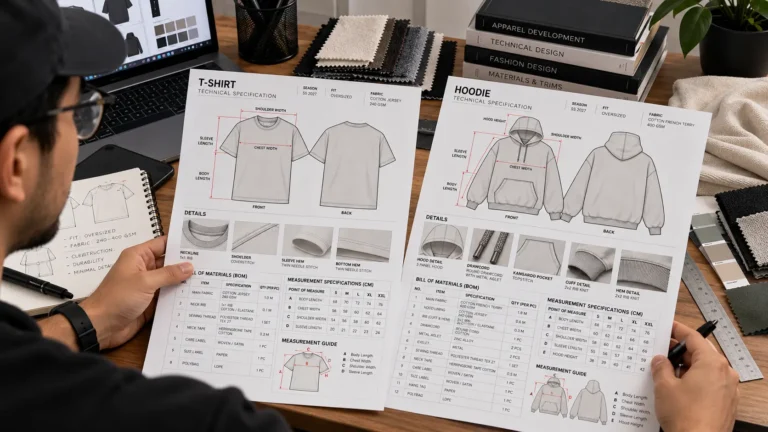
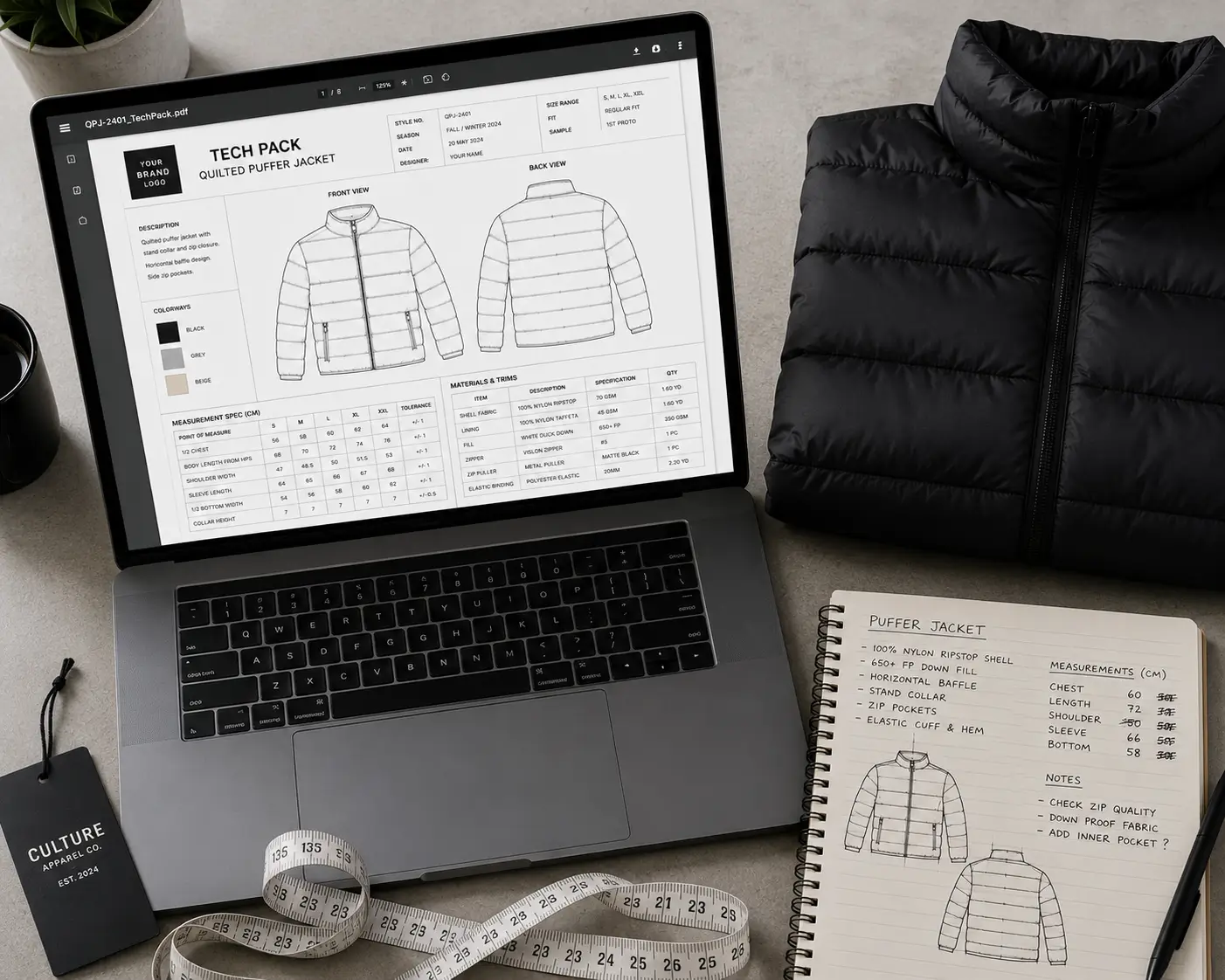
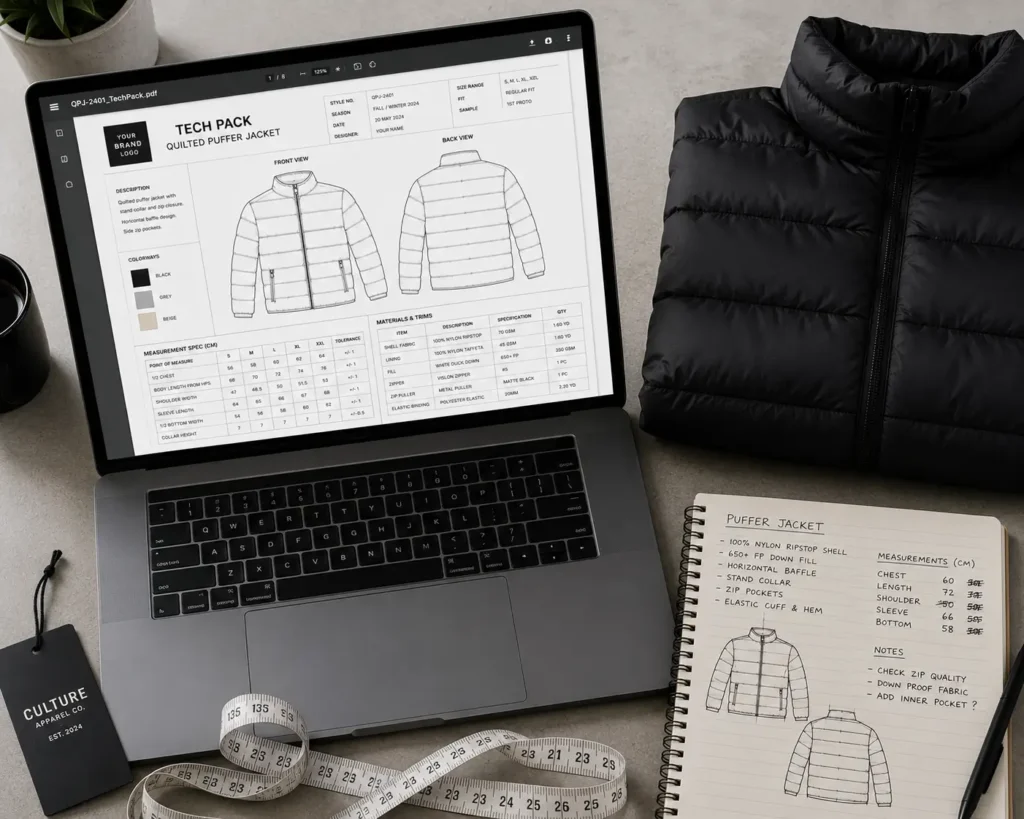
A puffer jacket tech pack is a technical document — usually a multi-page PDF or editable file — that gives a factory everything it needs to cut, construct, and finish your jacket without guessing. In short: it’s the blueprint that turns your design into a physical, sellable garment.
That sounds like any other tech pack, but a puffer is far more complex than a T-shirt or hoodie. A standard tech pack covers stitch type, trims, and basic measurements. A proper down jacket manufacturing template has to go further and specify:
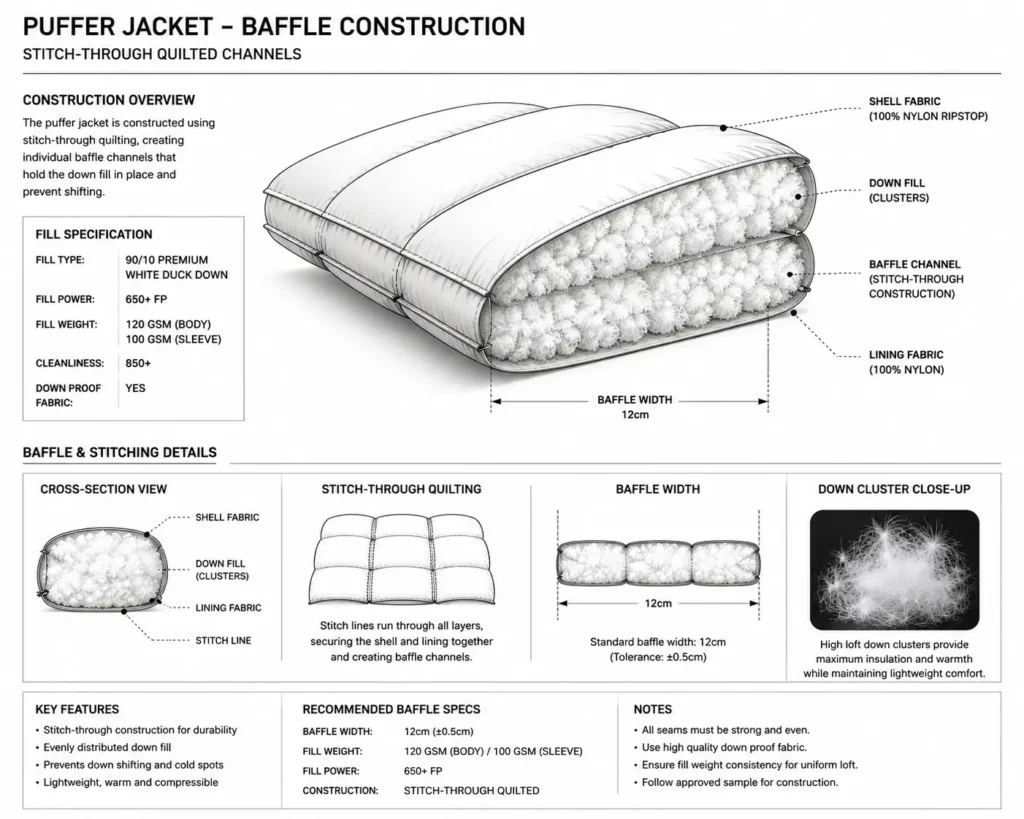
- Baffle and quilting layout, including channel width and stitch-through vs. box-wall construction
- Fill power and fill weight, by zone (body vs. sleeves vs. hood)
- Lining and shell GSM, plus water-resistant or DWR coating callouts
- Hardware details — zipper pulls, cord locks, snap toggles, and drawcord stoppers
- Insulation type (natural down vs. synthetic) and baffle attachment method
Getting this right saves real time and money. A complete set of puffer jacket clothing specs means fewer rounds of sample revisions, fewer confused emails with your factory’s merchandiser, and a much more professional first impression when you’re vetting new manufacturing partners.
This matters most in two situations: communicating fit and construction details to an overseas factory where language and measurement-system gaps are common, and scaling a streetwear brand from small-batch cut-and-sew into a repeatable, multi-season outerwear line.
DIY vs. Professional Tech Pack Templates
You technically can build a puffer jacket tech pack from scratch in Illustrator and Excel. The question is whether you should — and that depends on how complex your jacket is and how much your time and sample budget are worth.
For a basic, single-layer garment with no specialty construction, a DIY file from scratch is usually fine. Once you’re dealing with baffles, multi-zone insulation, and custom hardware, the margin for error gets a lot smaller, and so does the patience of your factory’s technical team.
💡 Pro Tip: Always specify your exact baffle width (for example, 3 inches) in your down jacket manufacturing template. Factories default to their own standard spacing if you don’t lock it in, and that single missing measurement can change the entire silhouette of your jacket.
| Feature | DIY From Scratch | General Clothing Template | S.i. Graphics Puffer Template ($14.99) |
|---|---|---|---|
| Accuracy of Outerwear Specs | Low — easy to miss fill power, baffle spacing | Medium — built for flat garments, not insulation | High — built specifically for puffers |
| Formatting | Inconsistent, factory-dependent | Standardized but generic | Industry-standard, factory-ready layout |
| Factory Compatibility | Variable | Good for basics, weak for outerwear | Designed around what outerwear factories expect |
| Time Investment | 8–15+ hours | 3–5 hours, plus manual edits for insulation | Under 1 hour to customize |
| Cost of Errors | High — missed specs = failed samples | Medium — generic fields get overlooked | Low — outerwear-specific fields built in |
The honest takeaway: a generic clothing template will get you through a basic crewneck. For a puffer, a down jacket manufacturing template that’s actually built for insulated outerwear is close to mandatory if you want to avoid paying for the same sample twice.
Top 7 Best Puffer Jacket Tech Pack Templates & Tools
1. S.i. Graphics Puffer Down Jacket Tech Pack Template — Best Overall Value
This is a dedicated puffer jacket tech pack built specifically for insulated outerwear, not a hoodie file with extra boxes bolted on. It covers baffle and quilting layout, fill power callouts, lining specs, and hardware detailing in a clean, factory-ready format.
Price: $14.99.
What’s included: Editable vector flats (front, back, side, hood detail), a complete bill of materials, point-of-measure grading sheet, and dedicated baffle/quilting annotation guides.
Best for: Advanced founders moving from blanks to cut-and-sew outerwear who need factory-ready puffer jacket clothing specs without hiring a technical designer.
- ✓ Purpose-built for puffers, not a generic template
- ✓ Editable vector flats included
- ✓ Instant download, ready to send same day
- ✓ Covers fill power, baffles, and hardware in one file
- ✗ Single-garment template — doesn’t cover other styles in your line
2. S.i. Graphics Complete Tech Pack Library — Best for Complete Brand Collections
If the puffer is one piece of a bigger drop, the Mega Bundle covers the rest of your line — hoodies, tees, joggers, outerwear, and more — in the same consistent, factory-ready format.
Price: $69.99.
What’s included: Every garment template in the S.i. Graphics library, including the standalone puffer tech pack, shared BOM and grading frameworks, and consistent factory-facing formatting across your whole collection.
Best for: Streetwear brands launching a multi-piece winter collection who want every tech pack — outerwear included — to look like it came from the same professional studio.
- ✓ Covers a full season’s worth of garment types
- ✓ Includes the puffer template plus everything else
- ✓ Consistent formatting across your entire line
- ✓ Significant savings versus buying templates individually
- ✗ More file than you need if you’re only producing one jacket
3. Techpacker — Best for Growing Teams & Collaboration
Techpacker is cloud-based tech pack software used by small-to-mid-size fashion teams for ongoing product development, not a single downloadable file. Pricing starts around $49 per user per month, scaling up with tier and seat count.
What’s included: Drag-and-drop spec cards, reusable BOM and measurement libraries, status tracking, and multi-user collaboration with version history.
Best for: Brands with a design team (not a solo founder) who need real-time collaboration across multiple stakeholders and ongoing seasons, not just a one-off puffer.
- ✓ Strong multi-user collaboration and permissions
- ✓ Reusable component libraries speed up repeat styles
- ✓ Cloud access from anywhere
- ✗ Recurring monthly cost rather than a one-time purchase
- ✗ Still requires you to upload your own flat sketches
4. Adobe Illustrator (DIY Route) — Best for Highly Custom Shapes
For founders with strong Illustrator skills who want total control over unusual paneling, custom hood shapes, or non-standard hardware placement, building flats from a blank canvas is still an option. Pricing runs about $22.99 per month for a single-app subscription.
What’s included: Nothing pre-built — you’re creating technical drawings, the BOM, and your puffer jacket clothing specs entirely from scratch.
Best for: Designers with deep Illustrator fluency who need a fully custom silhouette a template can’t accommodate.
- ✓ Unlimited creative and technical control
- ✓ Industry-standard software factories already expect
- ✗ Steep learning curve if you’re not already fluent
- ✗ Easy to forget critical outerwear-specific specs without a checklist
5. CLO3D — Best for Virtual Sampling
CLO3D is 3D garment simulation software that lets you drape and visualize a puffer digitally before cutting physical fabric, with plans running roughly $50–$100 per month.
What’s included: 3D draping and rendering tools, the ability to export 2D flats and rough measurement data, but no dedicated BOM or outerwear-specific spec template.
Best for: Brands with pattern-making experience who want to reduce physical sampling rounds by testing fit and drape virtually first.
- ✓ Genuinely reduces physical sample rounds
- ✓ Photorealistic renders help with pre-production buy-in
- ✗ Steep learning curve and pattern-making knowledge required
- ✗ Not a direct tech pack replacement — you’ll still need a separate spec document
6. Generic Free Tech Pack Template — Best Free Option (With Limitations)
A free, basic Excel or Illustrator tech pack template is a reasonable starting point if your budget is genuinely $0, but you’ll be reformatting fields for fill power, baffles, and hardware yourself.
Price: $0.
What’s included: Generic measurement and BOM fields built around flat-knit garments, not insulated outerwear.
Best for: Founders testing an idea before committing any money to documentation, with no intention to manufacture a puffer this season.
- ✓ Zero cost to get started
- ✓ Better than sending a factory nothing at all
- ✗ No fields for fill power, baffle spacing, or hardware detail
- ✗ Reformatting time often costs more than the $14.99 dedicated template would have
7. AI-Generated Tech Pack Tools — Best for Beginners Without Illustrator Skills
A newer category of tools generates a tech pack from uploaded product photos rather than requiring you to draw flats by hand, with pricing typically in the $29–$149 per month range depending on volume.
What’s included: Auto-generated flat sketches from photos, AI-suggested measurements, and exportable spec documents.
Best for: Founders with zero Illustrator experience who need a starting document quickly and plan to refine the outerwear-specific details (fill power, baffles) manually afterward.
- ✓ No design software skills required to get started
- ✓ Fast turnaround from photo to draft document
- ✗ Outerwear-specific detail (fill power, baffle construction) still needs manual review
- ✗ Recurring subscription cost for ongoing use
How to Choose the Right Down Jacket Manufacturing Template
Picking the right down jacket manufacturing template comes down to four factors: your factory’s specific requirements, your own skill level, your budget, and how complex your jacket actually is.
- Your factory’s requirements — Some factories have a preferred format or software. Ask before you buy or build anything.
- Your skill level — Comfortable in Illustrator and Excel? DIY or a template both work. Prefer a fill-in-the-blank format? A pre-built template saves real time.
- Your budget — A one-time $14.99–$79.99 template is dramatically cheaper than software subscriptions or a freelance technical designer.
- Complexity of your jacket — Standard baffles and stock hardware are template-friendly. Fully custom hood shapes or proprietary hardware may need custom Illustrator work.
Choose a standalone puffer template if:
- ✓ You only need to manufacture one or two outerwear styles
- ✓ You want to keep documentation costs under $20
- ✓ You’re moving from blanks into your first cut-and-sew puffer
Choose the Techpack Mega Bundle if:
- ✓ You’re designing a full winter collection, not just one jacket
- ✓ You need multiple garment types (hoodies, tees, outerwear) in one consistent format
- ✓ You’re scaling toward repeat seasonal production
Choose cloud software like Techpacker if:
- ✓ You have a design team collaborating in real time
- ✓ You’re managing many styles and seasons simultaneously
If your jacket uses standard construction and stock hardware, a dedicated puffer jacket tech pack template gets you to a clean sample fastest. If your design is highly unconventional, budget extra time for custom Illustrator work on top of any template.
Frequently Asked Questions
Do I need a specific tech pack for a puffer jacket?
Yes. A standard hoodie or T-shirt tech pack has no fields for fill power, baffle spacing, insulation zoning, or quilting construction. Without a dedicated puffer jacket tech pack, factories are left guessing on the details that actually determine warmth, loft, and fit — which is exactly where expensive sample errors come from.
What is “fill power” in a down jacket manufacturing template?
Fill power measures how much loft (volume) one ounce of down creates — higher numbers mean more warmth for less weight. Premium streetwear puffers typically use 600–800 fill power. Your down jacket manufacturing template should specify fill power by zone, since body, sleeves, and hood often use different insulation weights.
How do I spec the quilting and baffles on a puffer jacket?
You’ll need to choose between stitch-through construction (simple, lightweight, but creates cold spots at the seams) and box-wall construction (warmer, more structured, more expensive to produce). Either way, specify exact baffle channel width and spacing in inches or centimeters so the factory doesn’t default to their own standard.
What software do I need to edit these tech packs?
Most professional templates, including the puffer jacket tech pack templates from S.i. Graphics, use a combination of Adobe Illustrator (for vector flats) and Excel or Google Sheets (for the BOM and measurement charts). Both are widely compatible with what overseas factories already use.
Can I use generic puffer jacket clothing specs for my custom design?
Generic puffer jacket clothing specs work fine as a starting framework, but you’ll still need to adjust the points of measure (POM) for your specific fit — cropped, oversized, or boxy silhouettes all require different base measurements even if the construction method stays the same.
How much do professional tech packs cost to have made?
Hiring a freelance technical designer for a single puffer tech pack typically runs somewhere in the $150–$500 range, depending on complexity and revisions. A premium pre-built template, like the $14.99 S.i. Graphics puffer file, gets you a comparable factory-ready document for a fraction of that cost — you’re just doing the customization yourself.
What should be in the Bill of Materials (BOM) for a puffer jacket?
At minimum: outer shell fabric (with GSM and any DWR coating), lining fabric, insulation type and fill power, main zipper (often specified by brand, e.g., YKK), zipper pulls, drawcord toggles, elastic binding, and any interior pocket or baffle-specific trims.
Are tech packs better than just sending a reference sample?
You need both, but they serve different purposes. A reference sample shows general intent; a puffer jacket tech pack is your actual production blueprint and functions as the document factories are contractually building against. Relying on a reference photo alone leaves too much open to interpretation.
How do I specify hardware like custom zippers and toggles?
List the exact hardware brand and part number where possible (YKK zipper size and pull style, for example), along with placement measurements and finish (matte black, antique brass, etc.). If hardware is fully custom, include a separate detail drawing at actual size.
What is the difference between down and synthetic fill in manufacturing?
Down offers a better warmth-to-weight ratio and compresses more easily, but performs poorly when wet and costs more. Synthetic fill is cheaper, performs better when damp, and is easier to source consistently — but it’s bulkier for the same warmth level. Your down jacket manufacturing template should clearly state which one you’re specifying, since construction and BOM details differ between the two.
Conclusion
A complete puffer jacket tech pack is the cheapest insurance you can buy against expensive sampling mistakes.
To recap:
- Puffers need outerwear-specific documentation — fill power, baffle spacing, and hardware detail that generic templates don’t cover
- A dedicated down jacket manufacturing template is dramatically faster and cheaper than building one from scratch or hiring a freelancer
- Clear puffer jacket clothing specs mean fewer sample rounds and stronger relationships with your factory
If you’re producing one jacket, grab the Puffer Down Jacket Tech Pack Template for $14.99 and get a factory-ready file today. If you’re building a full collection, step up to the Complete Tech Pack Libraryand cover your entire line in one consistent format.
Either way, you’re one document away from a cleaner sample, a faster production timeline, and a factory relationship that takes you seriously from the first email.