Design - Create - Grow


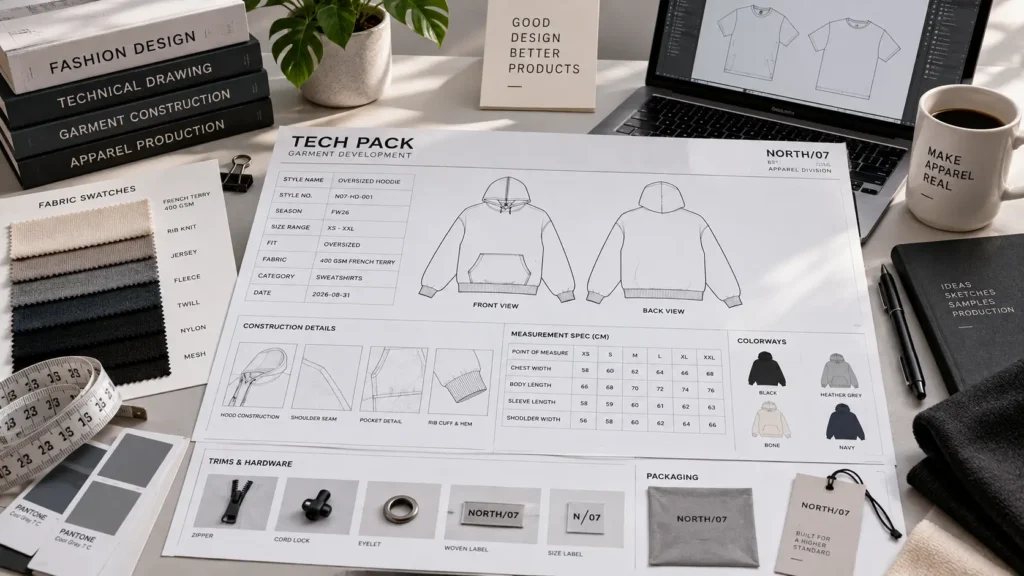
If you’ve ever sent a tech pack to a manufacturer and gotten confused questions back, the problem is often format, not content. A tech pack can contain all the right information and still fail to communicate it if the pages aren’t organized in a logical order or the files aren’t delivered the way the factory expects.
Tech pack format refers to how an apparel technical document is structured, laid out, and delivered — the page order, the sections included, and the file types used to share it. This article focuses specifically on that structure and delivery question, not on what a tech pack is in general.
There’s no single universal tech pack layout that every factory uses. Garment complexity, production method, and manufacturer preference all shape the final structure.
What follows is a practical breakdown of standard page sequences, the technical sections manufacturers commonly expect, and how file formats like PDF, AI, EPS, SVG, and spreadsheets fit into different stages of the process.
Quick answer: A tech pack format is the way an apparel technical document is organized, presented, and delivered so that designers, manufacturers, and production teams can understand the garment specifications. A typical tech pack may include technical flats, construction details, colorways, artwork placement, a bill of materials, measurement specifications, grading, labels, and packaging information, with the exact structure and file types varying by garment and manufacturer.
Table of Contents
What Does “Tech Pack Format” Mean?
“Format” and “content” aren’t the same thing. Content is what information the tech pack contains — measurements, materials, construction notes. Format is how that information is organized and presented: page order, section headings, table layouts, and the file type used to share it.
A tech pack isn’t just a folder of sketches and notes. It’s a structured reference document meant to be read in a specific way by people who aren’t in the room with you — pattern makers, sample room staff, quality control, and factory merchandisers. Poor structure forces the reader to hunt for information, which increases the chance of something being missed or misread.
The right format depends on the garment and the production workflow. A simple T-shirt tech pack and a multi-panel outerwear tech pack won’t need the same layout, and a document meant for a first factory inquiry looks different from one meant for bulk production sign-off.
A tech pack’s format generally covers:
- Document structure
- Page organization
- Technical information
- Specification tables
- Artwork and color information
- File delivery format
What Does a Standard Tech Pack Look Like?
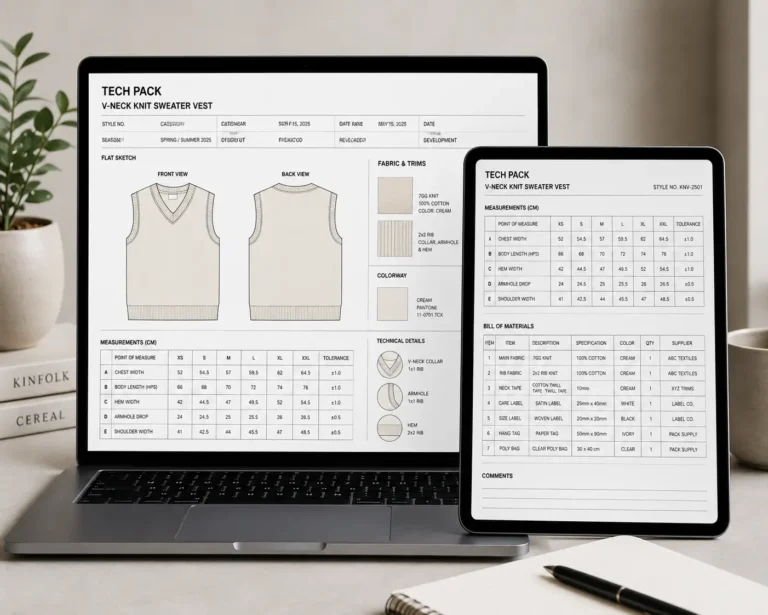
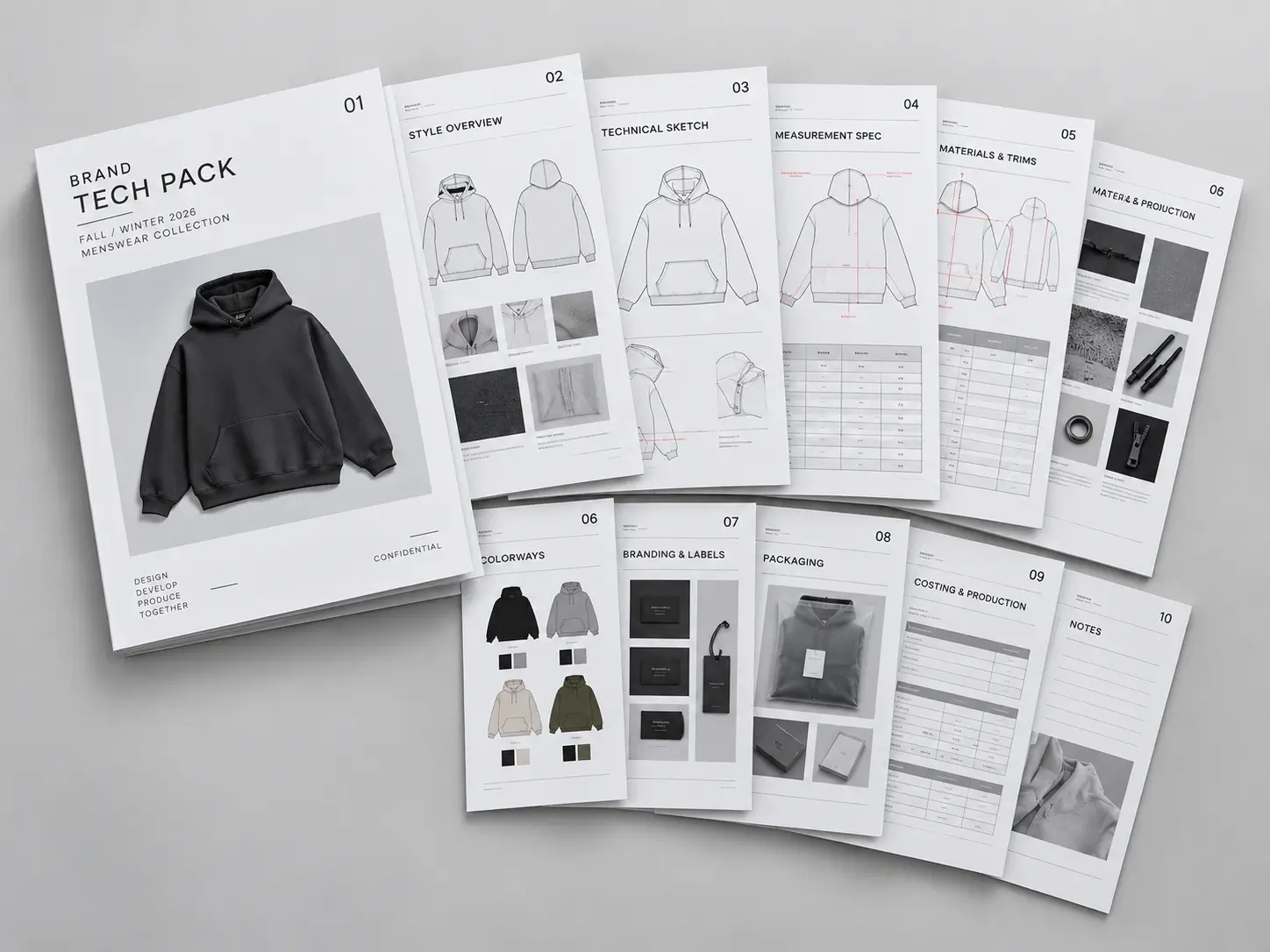
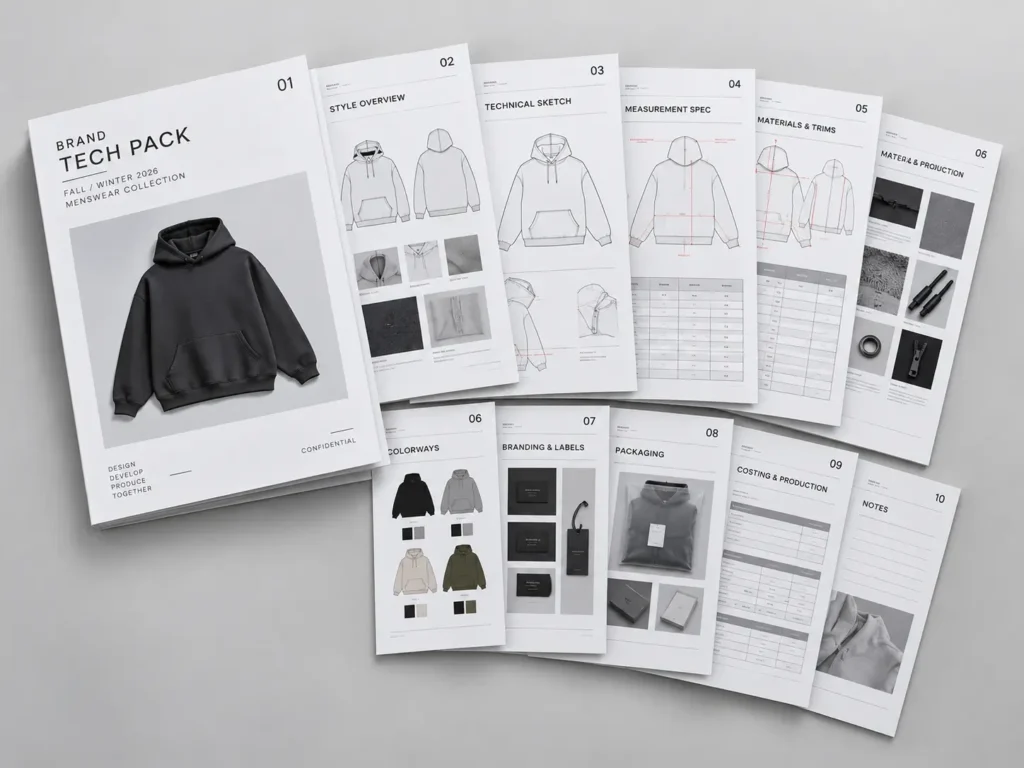
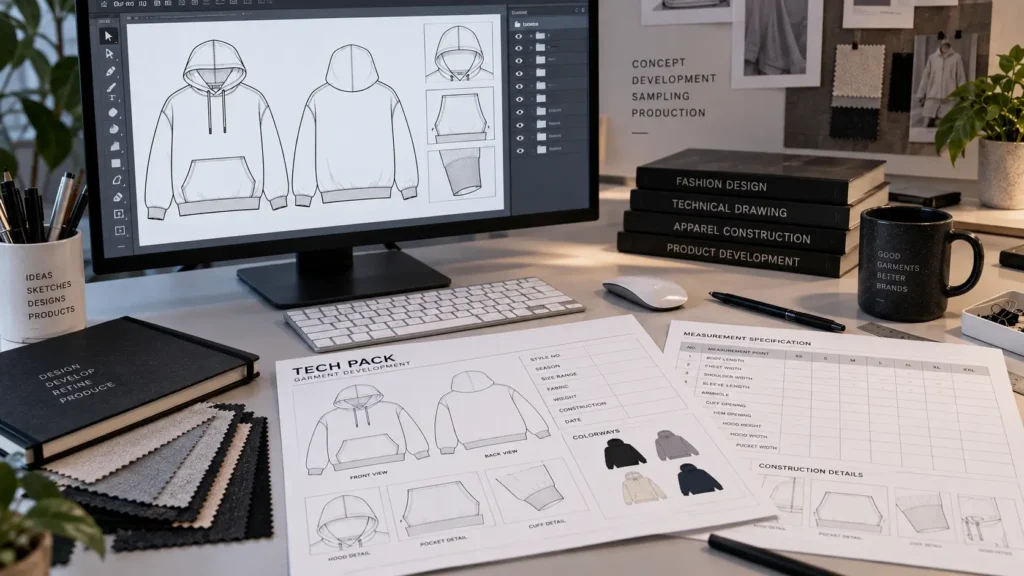
There’s no single mandated page order, but most professional apparel tech packs follow a logical progression: identify the style, show it visually, explain how it’s built, specify materials and measurements, then cover production and finishing details.
A common page sequence looks like this:
- Cover / Style Information
- Technical Flats
- Construction Details
- Colorways
- Artwork / Graphic Placement
- Bill of Materials
- Measurement Specification Sheet
- Grading / Size Specifications
- Labels and Branding
- Packaging / Folding Instructions
- Revision History / Approval Information
Not every garment needs every page. A basic tee with one colorway might combine colorways and artwork placement into a single page, while a jacket with multiple fabrics, hardware, and trims may need each section expanded across several pages.
The Main Pages in a Manufacturer-Ready Tech Pack
1. Cover and Project Information
The cover page identifies the document at a glance: style name, style number, season or collection reference where applicable, designer or brand name, version/date, and sample stage (e.g., proto, fit, pre-production).
Clear identification and revision control matter most once multiple versions of the same style are circulating between you, a pattern maker, and a factory. Without a version number and date on every page, it becomes easy for someone to work from an outdated file.
2. Technical Flats
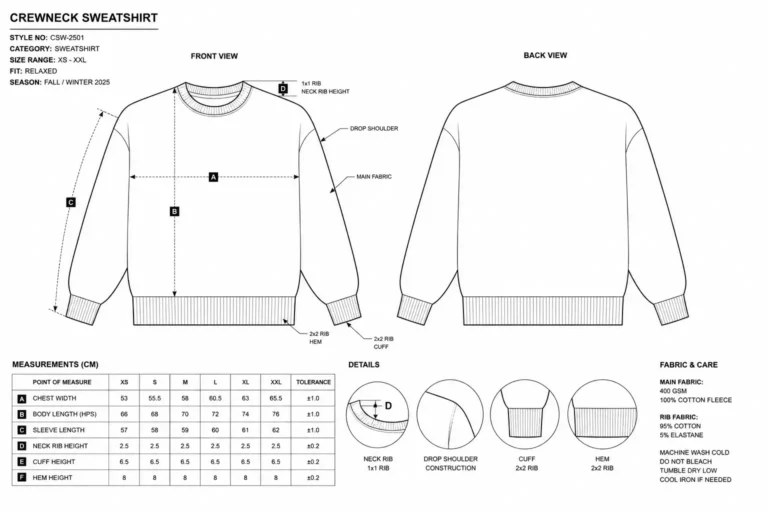
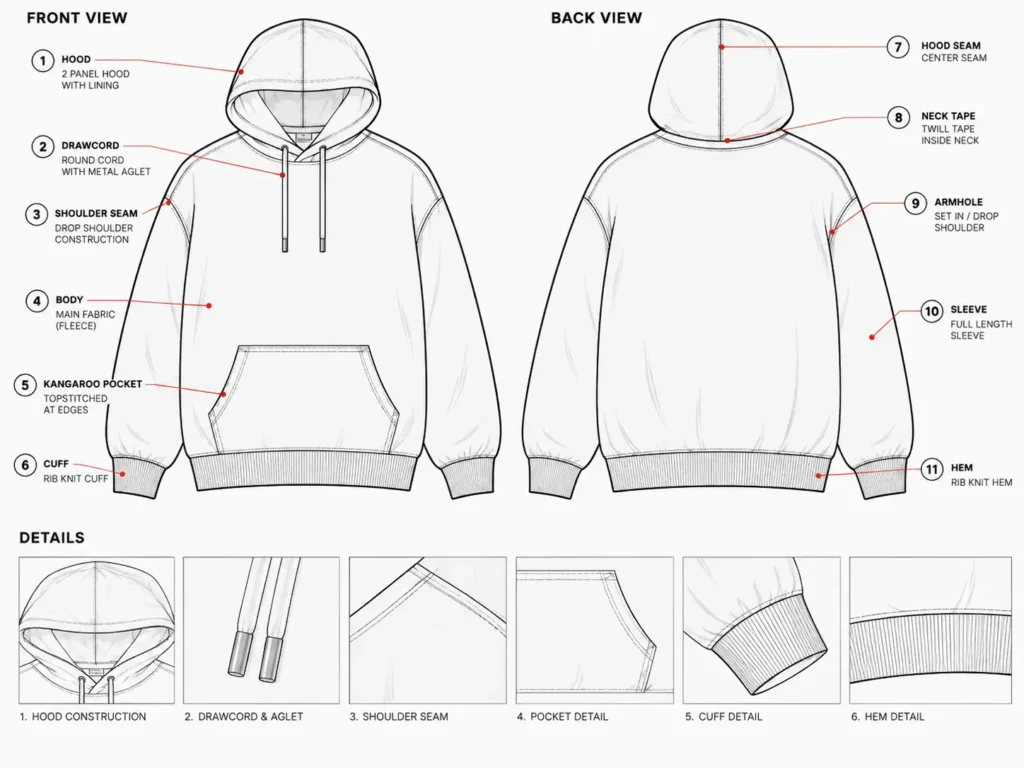
Technical flats are clean, proportionate line drawings of the garment — front view, back view, and side or detail views where relevant — showing seams, panels, pockets, closures, rib details, and construction lines.
Read More: What Is a Tech Pack
Flats communicate construction and design intent to a pattern maker or sample room. They aren’t fashion illustration; accurate proportions and clean lines matter more than artistic styling.
3. Construction Details and Callouts
This section documents seam types, stitching, hem construction, collars, cuffs, pockets, zippers, buttons, elastic, drawcords, panels, reinforcement, and any special construction requirements.
Numbered callouts on the flat sketch, cross-referenced to notes elsewhere on the page, are a common way to connect a specific point on the drawing to a specific instruction.
4. Colorways and Color Information
Colorway pages list colorway names, body colors, contrast colors, trim colors, thread colors where relevant, and Pantone references where appropriate, along with artwork colors.
The exact color-referencing system can depend on the fabric, the printing or dyeing process, and the manufacturer’s own color-matching workflow, so consistency across the document matters more than any single color system.
5. Artwork and Graphic Placement
This page shows where graphics go on the garment: placement measurements, print size, print position, and the decoration method (embroidery, screen printing, heat transfer, appliqué, embossing, etc.), along with artwork color references.
Showing placement inside the tech pack is different from supplying production-ready artwork. The tech pack communicates where and how big; the actual print-ready file is usually a separate asset.
6. Bill of Materials (BOM)
The BOM lists every material and component needed to build and finish the garment: main fabric, secondary fabrics, lining, rib, thread, zippers, buttons, labels, hangtags, packaging, and other trims.
It functions as a materials checklist a factory can use for sourcing and costing.
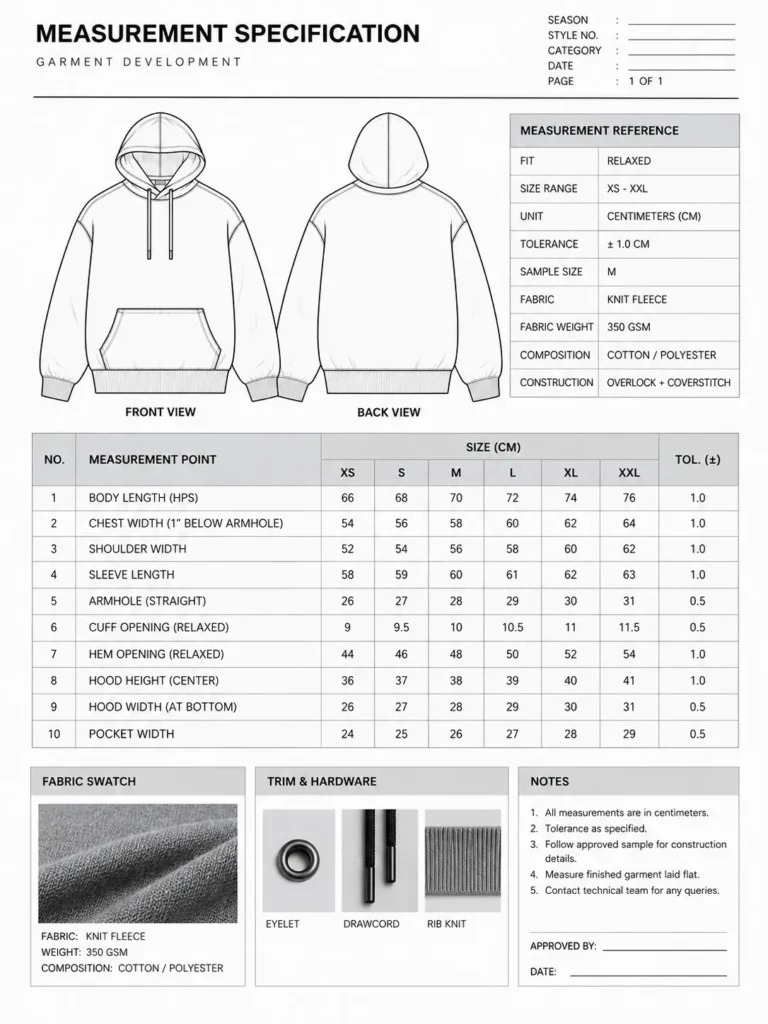
7. Measurement Specification Sheet
Read More: What Is Included in a Fashion Tech Pack
The spec sheet lists points of measure, finished garment measurements, measurement method, tolerance, sample size, size range, and units.
This page needs to be precise enough to be usable for both sample review and later production checking — vague or missing measurements are one of the most common sources of fit problems.
8. Grading and Size Specifications
Grading covers the base size, size range, grade rules where applicable, and size-specific measurements. How grading is documented and who handles it (designer, pattern maker, or factory) can vary by manufacturer and garment category, so this section’s format isn’t identical across every workflow.
9. Labels and Branding
This section covers main labels, size labels, care labels, country-of-origin information where applicable, branding placement, label dimensions, materials, and attachment method.
Labeling requirements vary by market and product type, so specific legal requirements should be confirmed through the relevant regulatory source for your target market rather than assumed from a template.
10. Packaging and Finishing Instructions
This page addresses folding, polybagging, size stickers, barcode information where applicable, hangtags, and carton requirements. Depending on the workflow, packaging specs may live inside the tech pack or in a separate production document.
11. Revision History and Approval Information
A revision log tracks version number, date, change description, sample round, approval status, and comments. This is especially important once specifications change after the first sample round, so everyone knows which version is current.
Tech Pack File Formats: AI, PDF, EPS, SVG and Excel
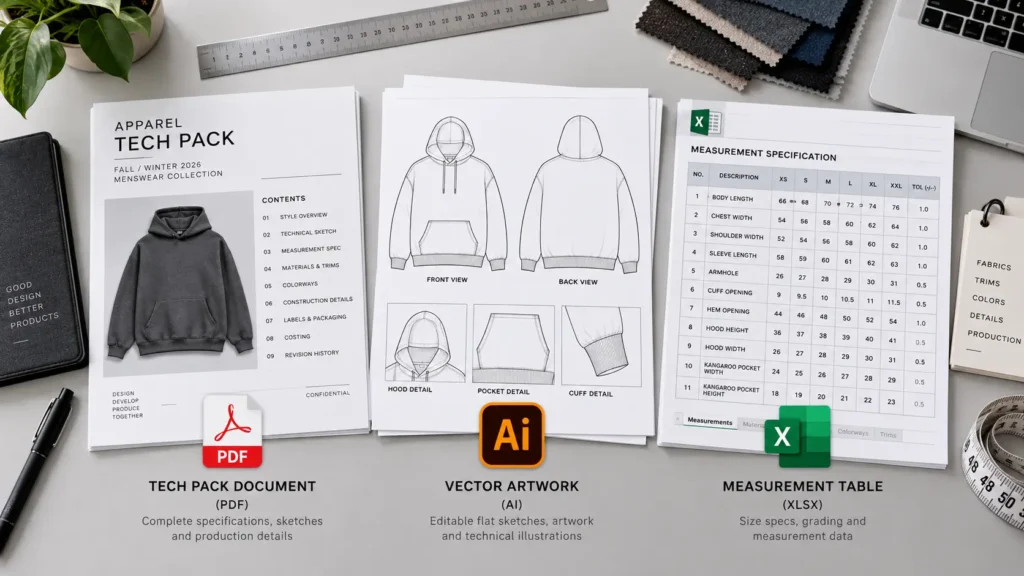
A tech pack “document” and the individual production assets inside it aren’t always the same file. The overall document might be a PDF, while the technical flats or artwork behind it could exist as separate AI, EPS, or SVG files.
| File format | Typical use | Main advantage | Potential limitation | When a manufacturer may request it |
|---|---|---|---|---|
| Sharing the full tech pack for review | Consistent layout across devices; hard to accidentally edit | Not natively editable; vector artwork can’t be easily modified | For factory review, quoting, and sign-off | |
| AI (Adobe Illustrator) | Editable technical flats, artwork, layout | Fully editable vector source file | Requires Illustrator or compatible software to open | If revisions or native artwork editing are needed |
| EPS | Vector artwork exchange | Broad compatibility with older design/production software | Less commonly used for full-document layout today | For certain print or embroidery artwork workflows |
| SVG | Scalable vector graphics for digital use | Lightweight, scalable, web-friendly | Not standard for full multi-page tech pack documents | Occasionally for digital or web-based asset delivery |
| Excel / spreadsheet | Measurement tables, BOM data | Easy to sort, calculate, and exchange structured data | No visual/technical flat information | For measurement specs, grading charts, or costing sheets |
| JPG / PNG | Reference images, artwork previews | Universally viewable, easy to preview | Not vector; not ideal as a production source file | For quick visual reference, not typically for production |
According to preservation documentation from the U.S. National Archives, the AI format is proprietary to Adobe and, from version 9 onward, embeds a PDF within the file, while earlier versions were compatible with the EPS format , with NARA recommending transformation to PDF for long-term access because of the format’s proprietary nature.
No manufacturer is guaranteed to accept every format listed here. Confirm accepted file types directly with your factory or production partner before finalizing delivery.
Tech Pack PDF vs. Editable AI File
PDF is useful when you need a locked, review-friendly version of the document — something a factory, a buyer, or a teammate can open on any device without altering it. It’s typically the format used for sharing an approved version of the tech pack.
Editable AI files are useful during active design development, when technical flats, artwork, or layout still need to change. Keeping the source file lets you update measurements, redraw a construction detail, or adjust artwork without rebuilding the document.
Many designers maintain both: an organized, backed-up AI source file for ongoing edits, and a current PDF export that matches the latest approved version. It’s worth double-checking that the PDF you send actually reflects the most recent AI file — mismatched versions are a common and avoidable mistake.
Manufacturers may separately request production artwork in another vector format (AI, EPS, or SVG) even if they’re also working from your PDF tech pack.
Build an Editable Illustrator Tech Pack
If you create technical flats and specifications in Adobe Illustrator, the Adobe Illustrator Tech Pack Template can provide a structured starting point for organizing your apparel documentation.
Digital Tech Pack vs. Printable Tech Pack
A digital PDF workflow is built for screen-based review — emailing a document, sharing it through cloud storage, or reviewing it on a tablet during a video call with a factory.
A printable workflow matters when a sample room or factory floor prints pages for physical reference during cutting, sewing, or quality checks. In that case, layout needs to stay readable at standard print sizes, with tables and text that don’t shrink into illegibility.
The underlying content — flats, BOM, measurements, construction notes — can be identical in both cases. What changes is formatting for the intended viewing context: file naming conventions, version control, and how the document is shared (cloud link vs. printed packet) matter more than whether it’s viewed on a screen or on paper.
What Format Do Manufacturers Actually Need?
There isn’t one universal file format that every manufacturer requires. What’s needed often depends on the stage of the process:
- Initial inquiry — often a PDF overview is enough to gauge interest and feasibility.
- Quoting — factories may want the BOM, measurements, and artwork details to price the garment.
- Sampling — a complete tech pack, plus separate artwork files, is commonly requested.
- Pattern development — pattern makers may need precise measurement specs and construction detail.
- Production — approved spec sheets, BOM, and sign-off documentation are typically required.
- Artwork production — separate vector artwork (AI, EPS, or SVG) is often requested apart from the tech pack PDF.
- Quality control — measurement tolerances and construction notes are referenced during inspection.
A factory may ask for a PDF tech pack, editable source files, vector artwork, measurement spreadsheets, pattern files, fabric and trim information, reference images, or an approved physical sample — sometimes several of these at once. The exact combination depends on the manufacturer, the garment type, and your production agreement, so it’s worth confirming requirements directly rather than assuming.
Example of a Properly Structured Apparel Tech Pack
Here’s a simplified, fictional example for a basic oversized T-shirt, showing how the sections might be organized into pages:
Style: Oversized T-Shirt
- Page 1: Style overview — style name, number, version, sample stage
- Page 2: Front/back technical flats — proportions, silhouette, seam lines
- Page 3: Construction details — hem, neckline, sleeve seam, stitch type
- Page 4: Colorways — body color options and trim colors
- Page 5: Artwork placement — chest print position, size, and placement measurements
- Page 6: Bill of Materials — fabric, thread, labels, hangtag
- Page 7: Measurement specification — points of measure, tolerance, sample size
- Page 8: Grading — size range and grade rule reference
- Page 9: Labels and packaging — label placement, folding, polybag notes
- Page 10: Revision history — version log and approval notes
This is one illustrative layout, not a fixed template every T-shirt tech pack must follow.
Tech Pack Format Checklist
Before sending a tech pack to a manufacturer, check that it includes:
- Style name and number
- Version/date
- Front and back technical flats
- Construction details and callouts
- Colorways
- Artwork placement
- Separate production artwork files (if required)
- Bill of Materials
- Fabric information
- Trim information
- Measurement specifications
- Tolerances
- Size range
- Grading information (where applicable)
- Labels
- Packaging instructions
- Revision history
- Correct, consistent file names
- Confirmation this is the current approved version
- Manufacturer-specific requirements confirmed in advance
How to Choose the Right Tech Pack Structure for Your Garment
- Simple T-shirt: T-Shirt Tech Pack Template — often fewer pages, with construction, colorway, and artwork sections sometimes combined.
- Hoodie or sweatshirt: Hoodie Tech Pack Template for Factory Production — typically needs dedicated pages for hood construction, pocket details, and rib specifications.
- Pants: Usually requires more detailed waistband, pocket, and closure construction pages.
- Outerwear: Often needs expanded BOM and construction sections due to multiple fabrics, linings, and hardware.
- Complex fashion garments: May require additional pattern and drape reference pages beyond the standard structure.
- Graphic-heavy garments: Need a more detailed artwork placement section, sometimes across multiple pages per placement.
- Multi-color collections: Benefit from a dedicated, well-organized colorway matrix rather than a single simple list.
More complex construction generally calls for more detailed documentation, but there’s no fixed page count that applies to every garment or brand.
Common Tech Pack Formatting Mistakes
- Using inconsistent page layouts across a collection
- Missing style numbers or version information
- Sending outdated PDFs
- Providing flats without construction notes
- Missing points of measure
- Using unclear or mixed measurement units
- Leaving tolerances undefined
- Failing to clearly identify colorways
- Embedding low-quality or low-resolution artwork
- Not supplying separate production artwork when the factory requires it
- Combining too much information onto a single page
- Adding too many unnecessary pages that dilute key information
- Assuming every manufacturer uses the same format or file type
- Failing to document revisions between sample rounds
- Sending editable source files without clear organization or naming
Frequently Asked Questions
What is a tech pack format?
It’s the structure, layout, and file delivery method used to present an apparel technical document — how pages are organized and which file types are used to share them, separate from the technical content itself.
What is the best tech pack file format?
There’s no single best format. PDF is commonly useful for review and sign-off, AI is useful for editable technical flats and artwork, EPS and SVG suit certain vector-artwork workflows, and spreadsheets work well for measurement and BOM data. The right choice depends on the stage of the process.
Should I send a tech pack as a PDF?
PDF is often a practical choice for sharing a locked, reviewable version with a factory or client. A manufacturer may also separately request editable source files or production artwork depending on the workflow.
Do manufacturers need the original AI file?
It depends on the manufacturer and the task. An AI file can be useful for editable technical flats and artwork, but not every factory requires or requests it — many work primarily from the PDF and separate artwork files.
How many pages should a tech pack have?
Page count varies based on garment complexity, construction, number of colorways, artwork, trims, size range, and manufacturer requirements. There’s no fixed number that applies to every style.
What should be included in a clothing tech pack?
Commonly: technical flats, construction details, colorways, artwork placement, a bill of materials, measurement specifications, grading information, labels, packaging notes, and a revision history — with the exact combination depending on the garment.
Can I create a tech pack in Adobe Illustrator?
Yes. Illustrator is commonly used for technical flats, page layout, and vector artwork within a tech pack. Measurement tables or BOM data are sometimes managed separately in spreadsheet software.
Do manufacturers prefer digital or printed tech packs?
Both are used depending on the factory and production environment. A clear digital PDF is often practical for sharing and review, while printed pages may still be used in sample rooms or on the production floor.
Conclusion
Tech pack format isn’t about following one fixed template — it’s about organizing information so a manufacturer can read it without guessing. A manufacturer-ready document is defined by clear identification, logical page order, complete technical sections, appropriate file types for each stage, and consistent version control.
Key takeaways: structure your pages around a logical design-to-production flow, match your file format to the task (PDF for review, AI for editable source work), confirm requirements directly with your manufacturer since they vary, and keep a clear revision history as specifications evolve.
If you’re just building your first structured document, the Fashion Tech Pack Template offers a straightforward starting layout. If you’re developing multiple styles and want a consistent structure across a collection, the Complete Tech Pack Library can provide a repeatable framework to build from.
A tech pack won’t replace sample review, fitting, or ongoing manufacturer communication — but a well-organized one removes a lot of the ambiguity that causes avoidable back-and-forth.